flowchart TD
    A["Define the physical installation<br/>screen, reflector, audience, image plane"]
    B["Calculate framing and scale<br/>full body, eye line, apparent floor"]
    C["Choose capture method<br/>black stage or chroma key"]
    D["Light the subject evenly<br/>protect edges and control motion blur"]
    E["Key, crop, and clean the image<br/>remove spill and edge contamination"]
    F["Composite over true black<br/>preserve strong local contrast"]
    G["Add intentional styling<br/>glow, scan lines, color, distortion"]
    H["Test on the real optical system<br/>not only on a monitor"]
    I["Correct alignment and brightness<br/>match the physical environment"]
    J["Deliver at native resolution<br/>avoid crushing detail or lifting black"]

    A --> B --> C --> D --> E --> F --> G --> H --> I --> J

    classDef plan fill:#eef4ff,stroke:#3b82f6,color:#172033,stroke-width:1.5px;
    classDef capture fill:#f3f0ff,stroke:#7950f2,color:#241d3a,stroke-width:1.5px;
    classDef finish fill:#ecfdf3,stroke:#2f9e44,color:#17351f,stroke-width:1.5px;
    classDef test fill:#fff4e6,stroke:#e67700,color:#422b08,stroke-width:1.5px;

    class A,B plan;
    class C,D capture;
    class E,F,G finish;
    class H,I,J test;
Projection Holograms
How Pepper’s Ghost creates the floating images familiar from cinema—and how to produce content that makes the illusion convincing
Holography
An illustrated introduction to projection holograms: their theatrical origins, optical principle, digital stage systems, and practical content-production workflow.
Keywords
projection hologram, Pepper’s Ghost, floating image, hologram projection, virtual production, stage projection, telepresence, chroma key
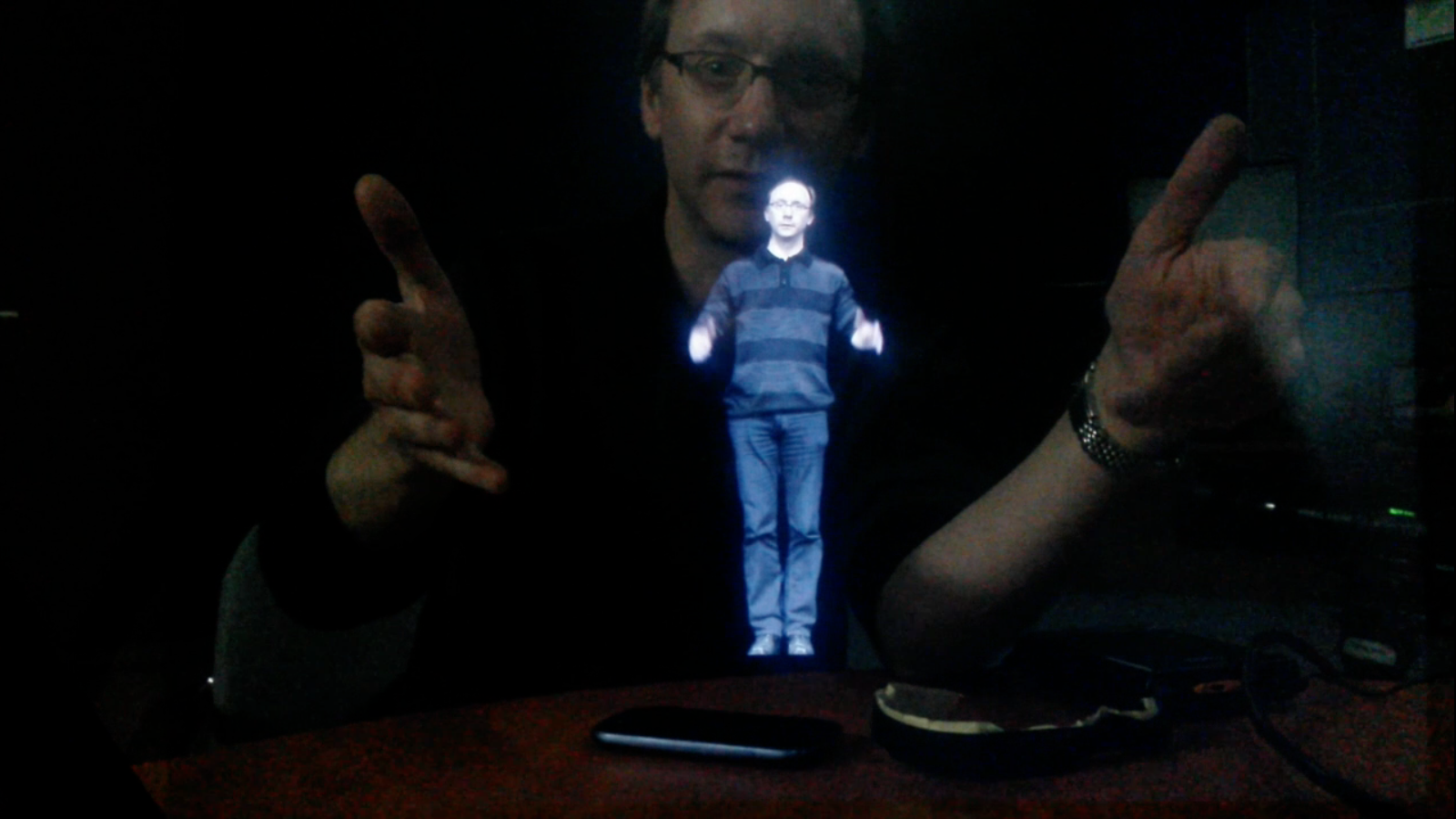
The hologram we know from the movies
A luminous person appears in empty space. The figure can address a live presenter, perform on a stage, or seem to stand inside a small display. This is the image that popular cinema has taught us to call a hologram.
Most installations producing this effect are not holograms in the optical sense. They do not record and reconstruct a light Wavefront, and the viewer does not receive the continuous parallax of a true holographic image. They are better described as projection holograms: carefully staged reflections based on the centuries-old illusion now known as Pepper’s Ghost.
The distinction does not make them less interesting. Projection holograms combine optics, cinema, scenography, performance, and real-time media to create one of the most convincing simulations of the “hologram” imagined in science fiction.
Video introduction
The lecture below introduces the history and optical construction of the effect, then demonstrates how to prepare imagery that appears to float rather than look like an ordinary video reflected on glass.
Watch “How to Make Holograms Like in the Movies?” on YouTube
NoteProjection hologram or true hologram?
A true hologram reconstructs a light wavefront and can reproduce optical depth and parallax. A projection hologram superimposes a reflected image over a physical scene. It is an illusion—but one with a long history and a powerful visual language.
From theatrical ghost to digital performer
Mirror-based apparitions predate cinema. Giambattista della Porta described ways of creating spectral images with mirrors and controlled light in Magia Naturalis. During the nineteenth century, Henry Dircks developed a theatrical apparition, and John Henry Pepper adapted it for practical stage presentation at the Royal Polytechnic Institution. The technique became permanently associated with Pepper’s name.
The staged illustration of The Haunted Man shows the essential arrangement: an actor hidden below the visible stage is brightly illuminated, while a large inclined transparent surface reflects the actor toward the audience. The reflection shares the audience’s view of the physical set, so the performer appears as a transparent ghost inside the scene.
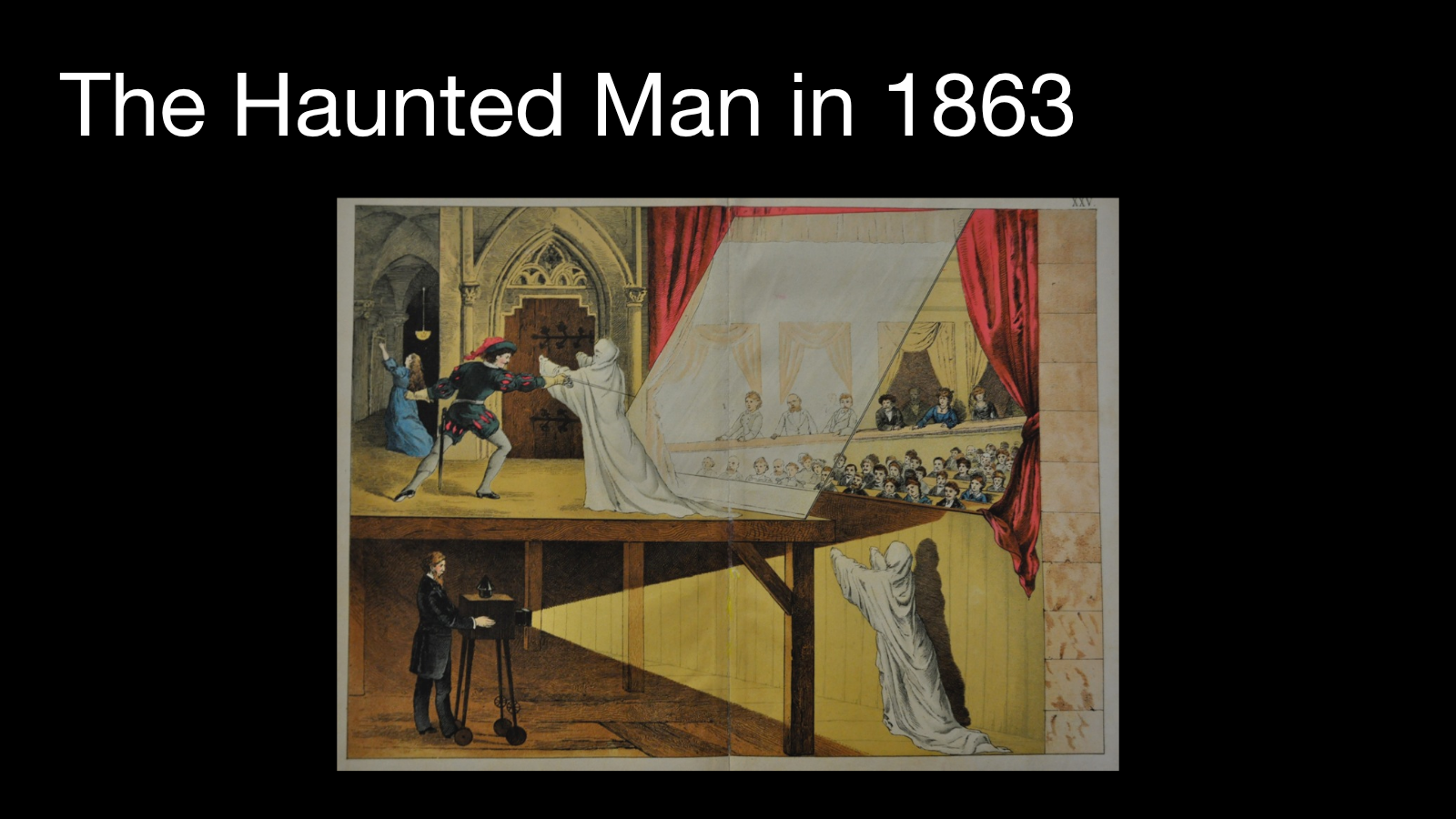
Digital projection changes the image source but not the core principle. A projector, LED display, or monitor replaces the hidden actor. Video can now be switched instantly, animated, streamed from a remote location, or generated in real time. The optical illusion remains an interaction between light, reflection, and a visible physical environment.
How the illusion works
Two views occupy the same space
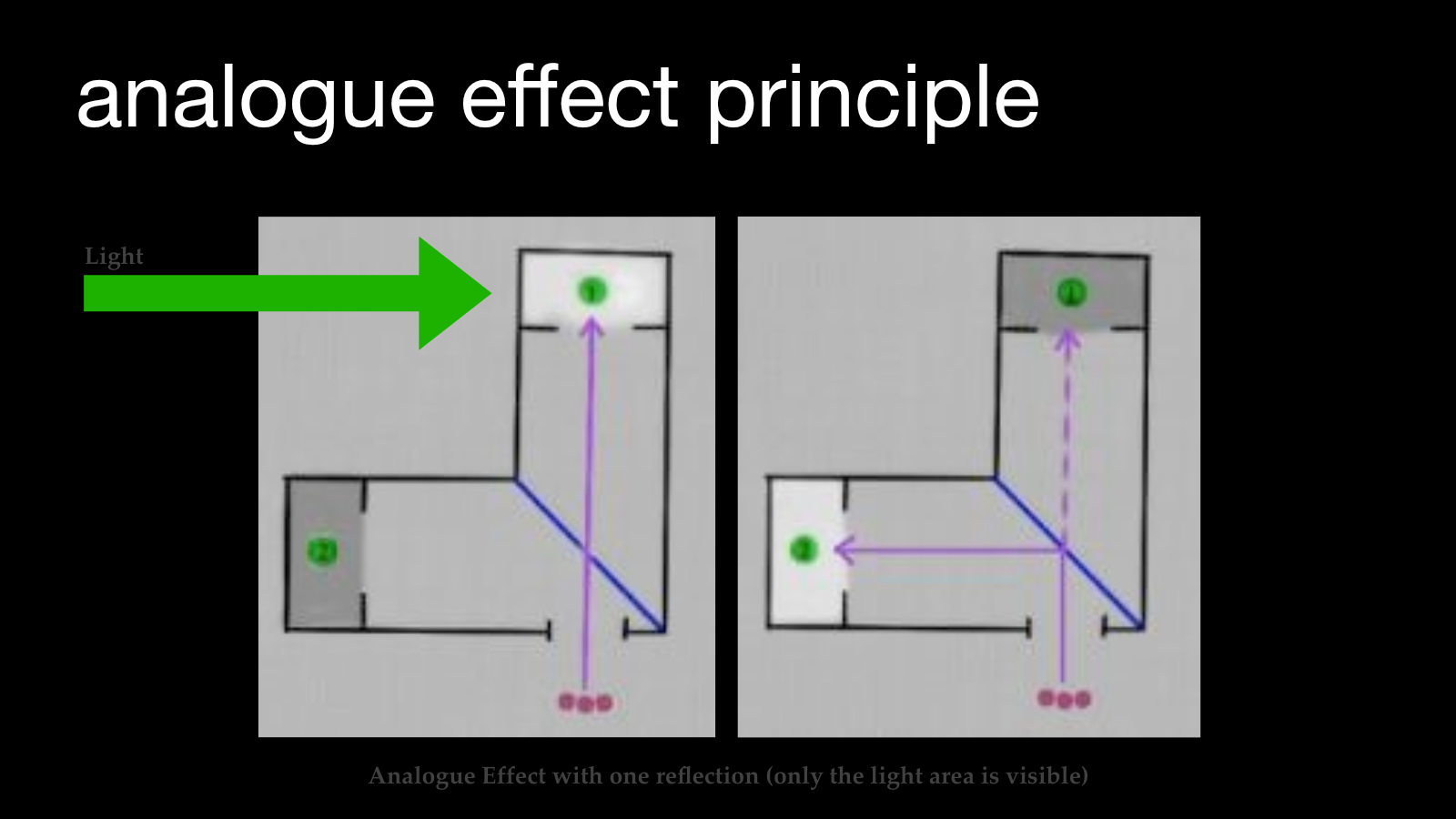
A transparent reflector—glass, acrylic, or a specialized foil—is placed at an angle between the audience and the stage. The audience looks through it toward the physical set. At the same time, the surface reflects light coming from a hidden image source.
The visual system combines these two paths:
- Transmitted view: the real set, presenter, or object behind the transparent surface.
- Reflected view: the illuminated performer or video image hidden outside the audience’s direct line of sight.
The reflector acts like a window and a mirror at once. When its geometry is correct, the reflection appears to occupy a position inside the transmitted scene.
Black becomes transparent
The content is normally composed against black. This is not a conventional alpha channel: it is an optical consequence of controlling emitted light.
- Bright pixels send light toward the reflector and become visible.
- Dark pixels contribute little or no reflected light.
- The audience continues to see the physical scene through those dark image areas.
Perfect black therefore determines how cleanly the image separates from its rectangular display frame. Any lifted black level, spill, haze, or compression noise can reveal the hidden screen and weaken the illusion.
One reflection or several
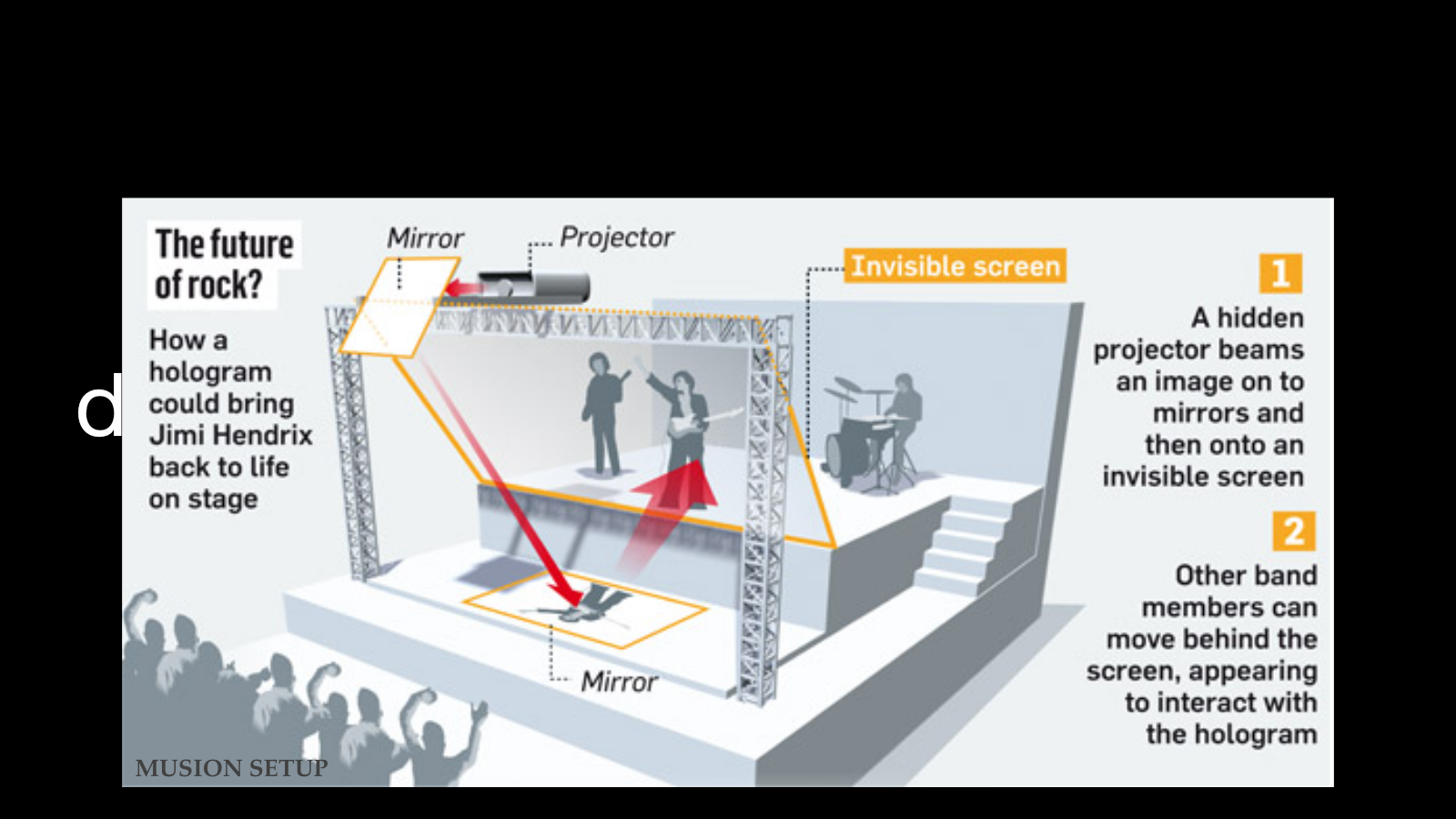
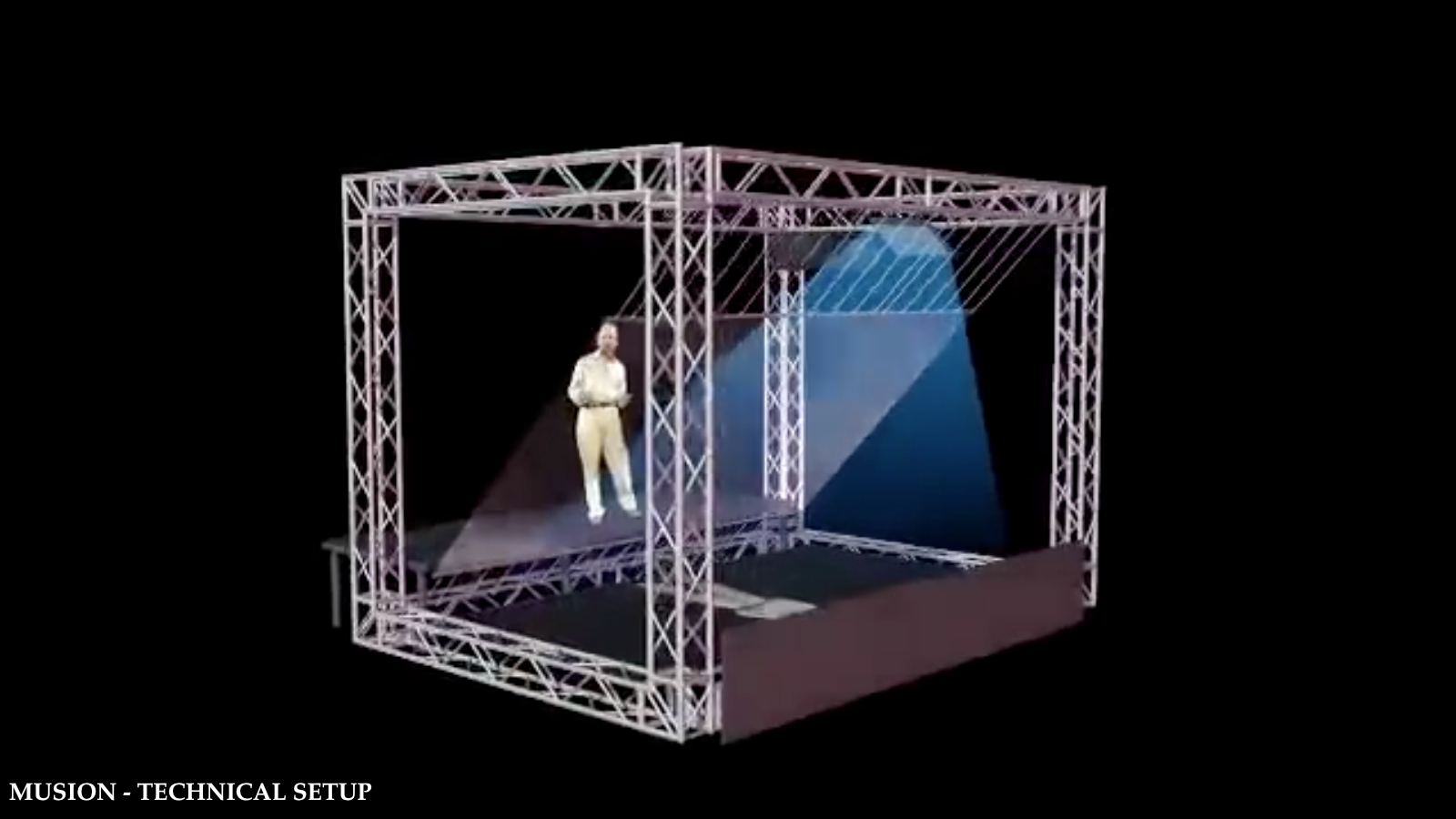
A small display may use one inclined plate and a phone or monitor. A stage system can use a projector, a floor screen, a redirecting mirror, and a large foil stretched across the performance area. Additional reflected paths can combine several image planes, but each one adds alignment, brightness, and contrast challenges.
Designing the image for depth
The reflection itself remains a flat image. The impression of depth comes from how that image is composed relative to the real environment. Several content strategies are especially effective.
Floating content
An isolated person or object is surrounded by black and positioned away from visible boundaries. This is the familiar concert, telepresence, presentation, and trade-show treatment. Because no rectangular background is visible, the subject appears detached from the display surface.
Overlapping content
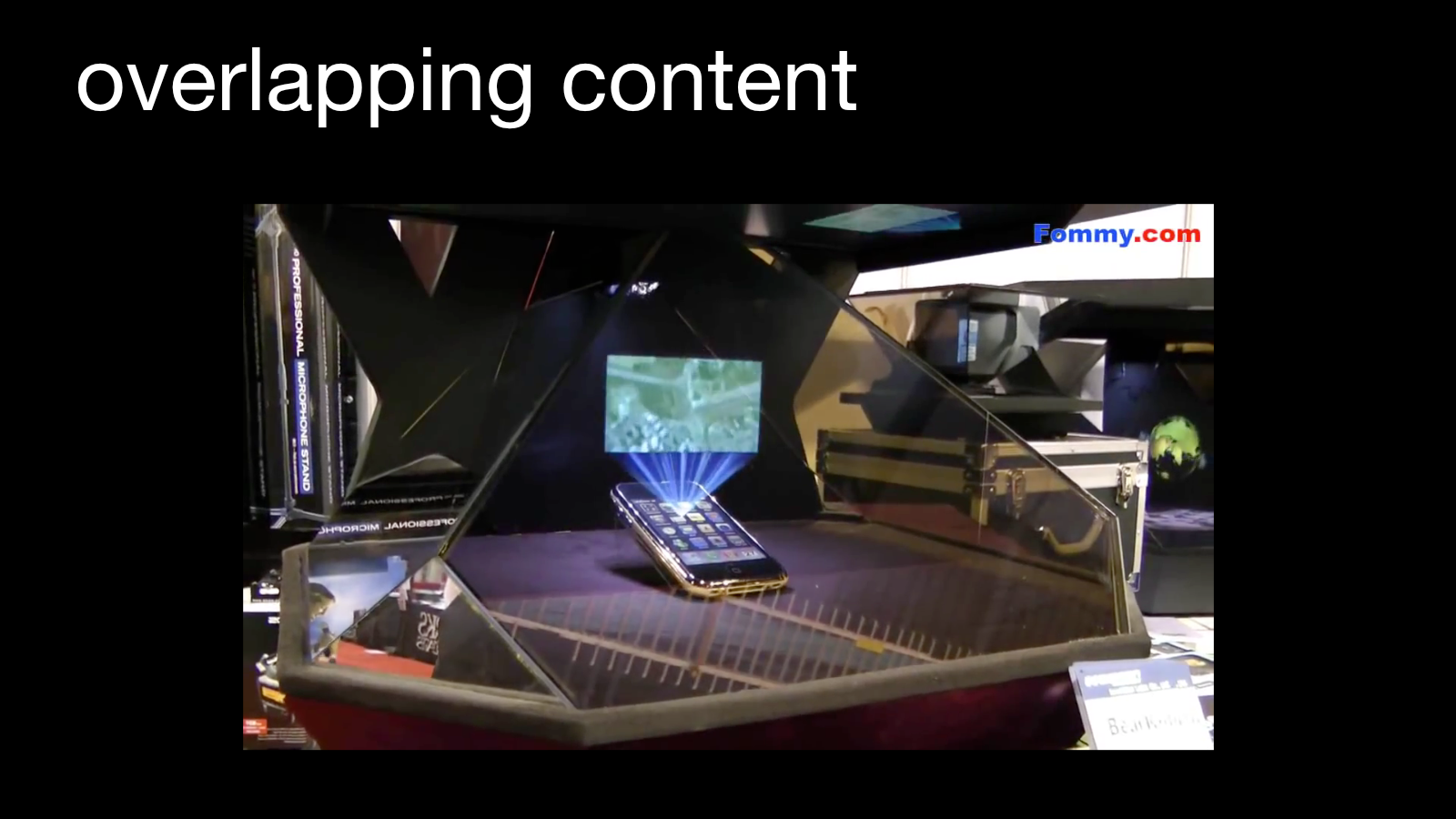
The reflected image is aligned with a physical product, presenter, or set. A virtual label can hover over a real object; a remote speaker can address someone on stage; animation can pass in front of or behind scenic elements. Careful occlusion is one of the strongest available depth cues.
Multiple layers and viewing angles
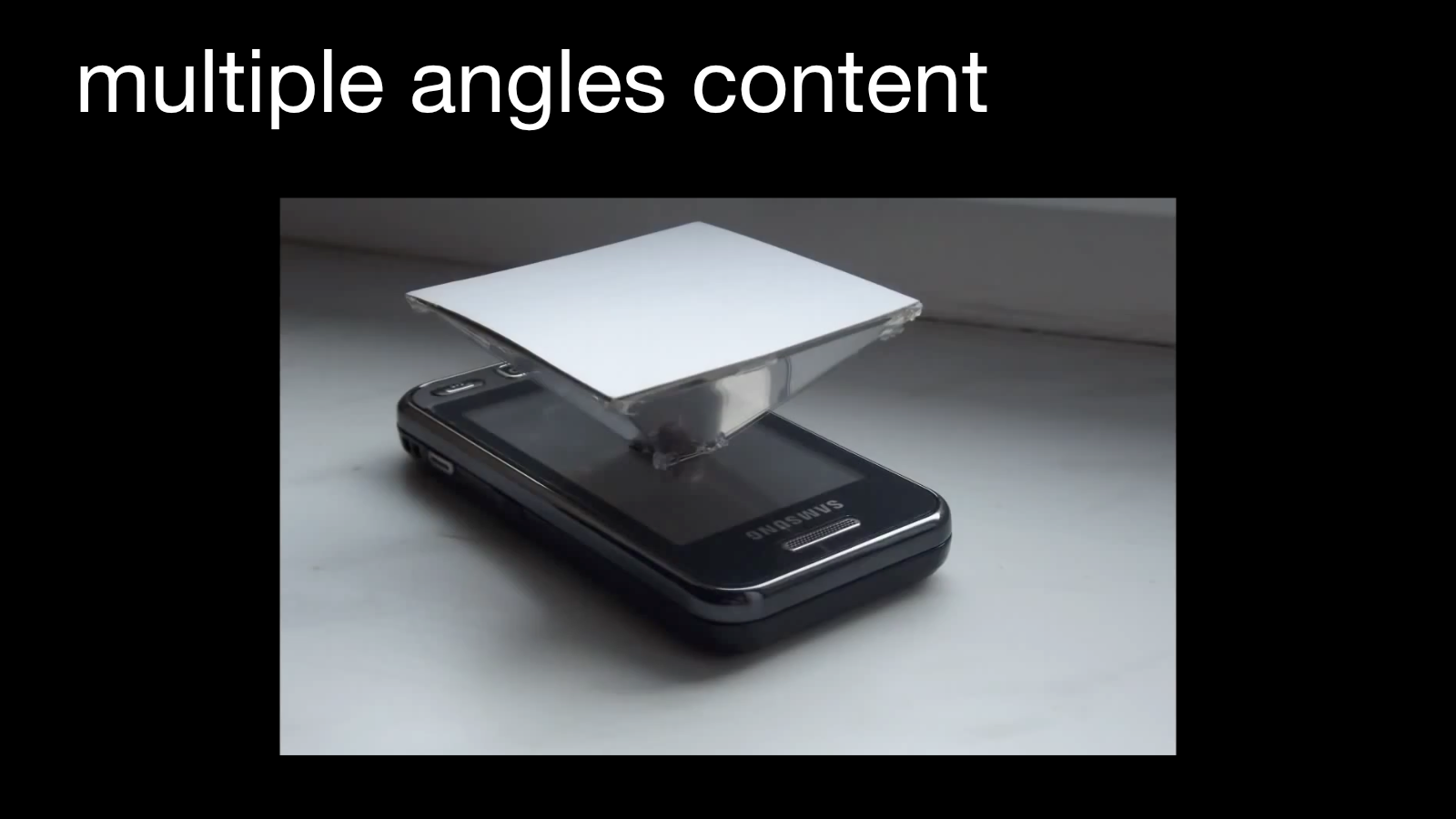
More elaborate systems distribute imagery across several apparent depths or reflect the same source in several directions. The result can feel more volumetric, but it is still constrained by the designed viewing zone. Unlike a true hologram, the image does not reveal new sides naturally as the viewer moves.
Producing content that survives the illusion
Projection hologram production should begin with the physical installation. Screen size, reflector angle, audience position, projector brightness, and the apparent image plane determine how the performer must be framed and scaled. Treating the display as an afterthought usually produces the familiar miniature or “person trapped in a box” appearance.
1. Design for the actual device
Determine the apparent floor, image height, and performer’s eye line before filming. A standing person should appear to make contact with the virtual floor rather than float accidentally above it. If a live presenter will interact with the image, record both performances with matching sight lines and timing.
2. Capture a clean subject
A true black studio can work when the subject, costume, and floor can be kept separate from the background. Chroma key is often more flexible, but it requires:
- uniform background illumination;
- enough subject separation to limit spill;
- controlled motion blur around hands and clothing;
- a clean floor or a planned crop;
- sharp, well-exposed edges.
Dark clothing may disappear into the final black composite, while translucent materials, hair, and fast motion require particular care.
3. Build a precise matte
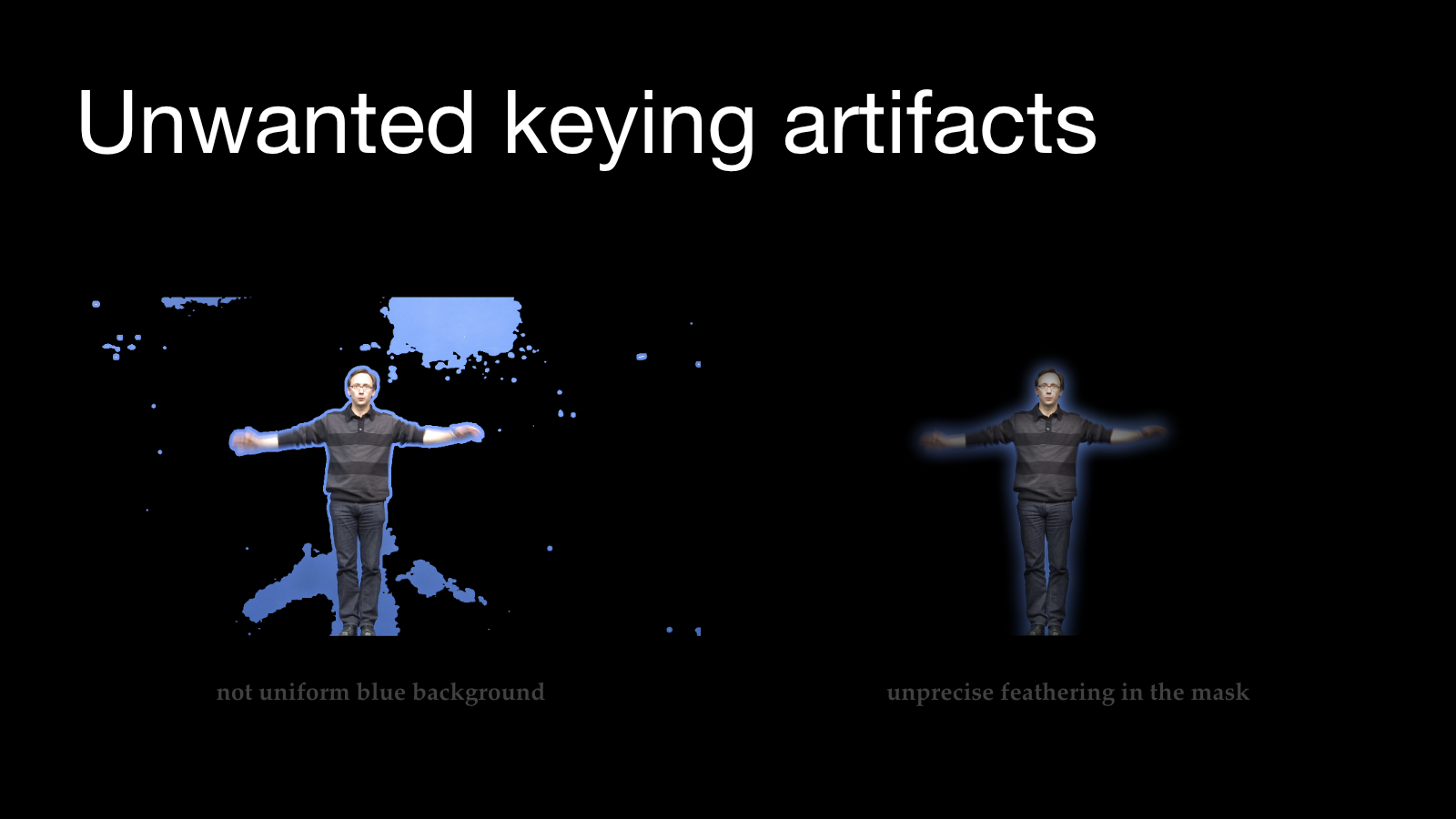
The keyed subject must be cropped and composited on true black. The matte should remove the studio without eroding fine detail or surrounding the performer with a soft halo.
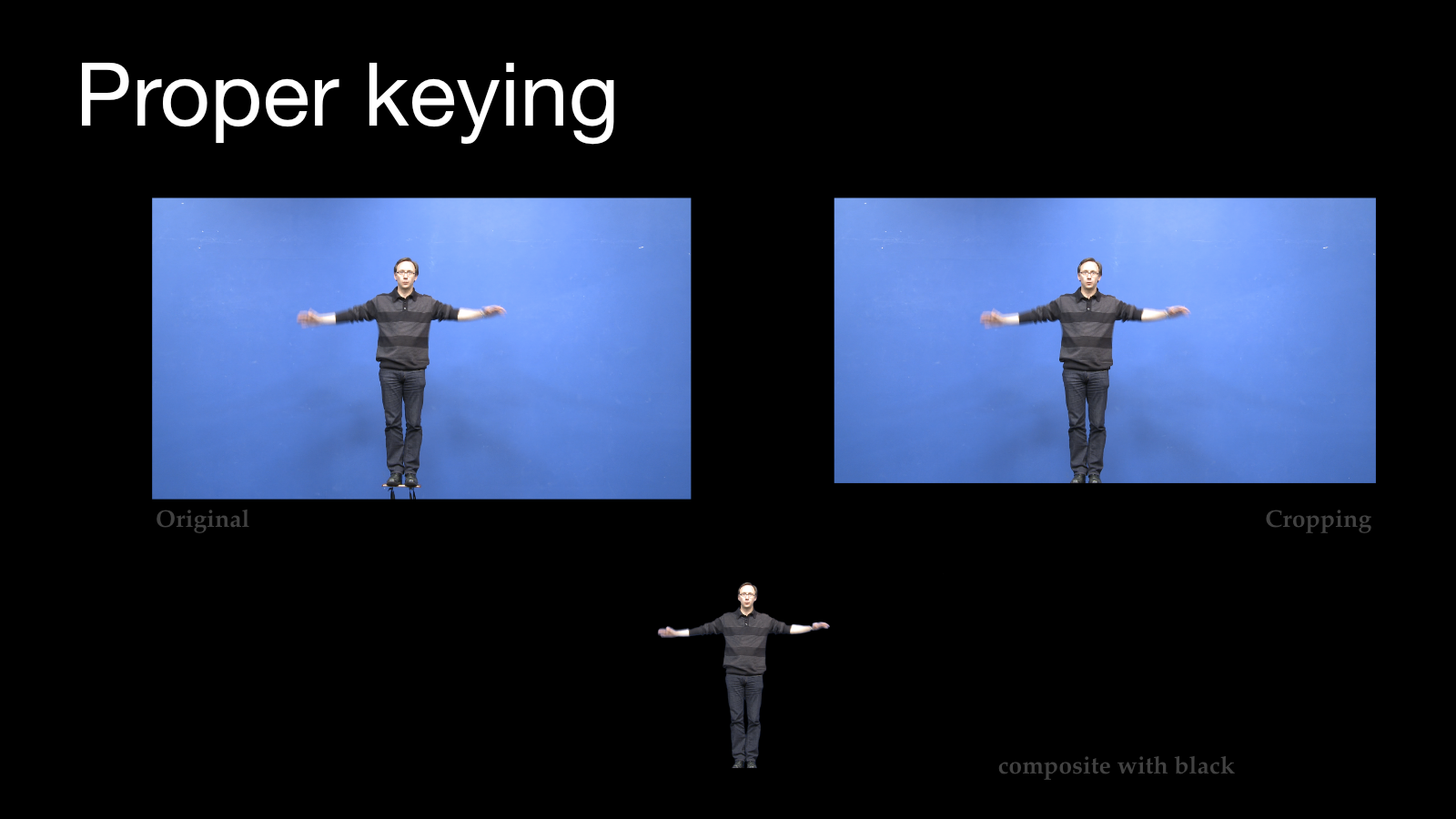
Uneven chroma illumination leaves patches around the body. Excessive feathering replaces those patches with a broad glow. Both defects become very obvious when projected, because the installation magnifies low-level image contamination.
4. Separate mistakes from style
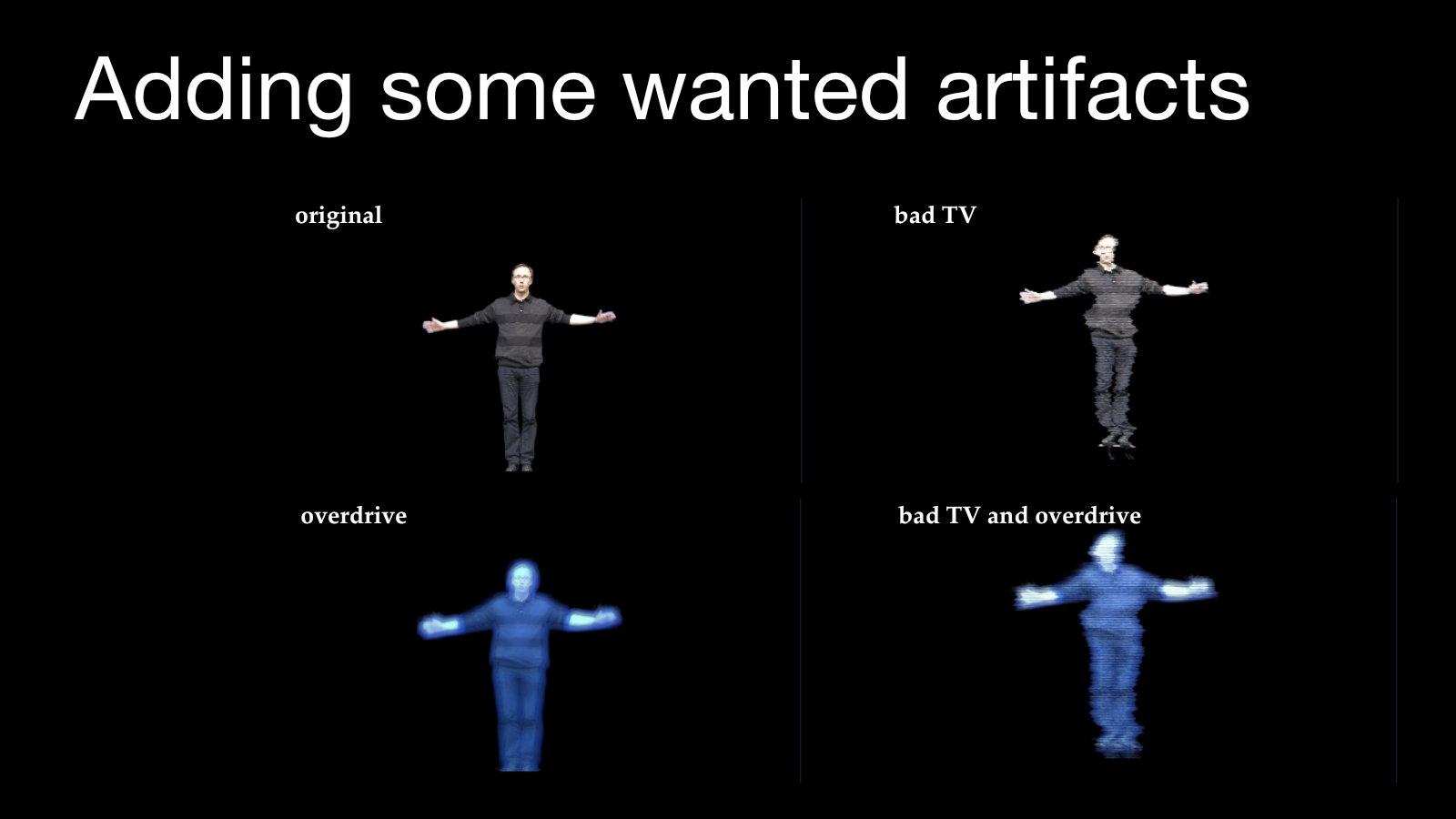
The science-fiction appearance of a projection hologram is often deliberately imperfect. Blue coloration, bloom, scan lines, signal breakup, or electronic distortion can help the image match the visual language established by cinema. These effects should be added after a clean composite has been created.
An uncontrolled halo is a keying error. A designed glow is an aesthetic decision. Starting from a clean master keeps that decision reversible.
Presence depends on more than optics
The strongest projection holograms are staged performances rather than floating video players. Several cues work together:
- Occlusion: virtual imagery appears to pass behind or in front of physical elements.
- Scale: the image matches the expected size of a person or object.
- Eye line: live and recorded performers look toward the correct spatial position.
- Timing: gestures and dialogue create the impression of responsiveness.
- Shared lighting: color and brightness feel compatible with the room.
- Sound localization: the voice appears to originate near the image.
Interactivity strengthens the effect because a responsive figure seems to understand the space it occupies. This may be achieved through a live remote performer, tracked playback, a real-time rendered character, or precisely rehearsed timing.
Where projection holograms work well
Projection holograms are best suited to environments where the light, background, and viewing position can be controlled:
- stage performances and concerts;
- museums and science centers;
- product launches and trade shows;
- themed attractions;
- telepresence and live presentations;
- in-camera virtual effects;
- compact exhibition and retail displays.
They are less convincing in bright uncontrolled environments or when the audience can walk far outside the intended viewing zone. Large installations also require significant space for the hidden source, reflected light path, rigging, and safety access.
What to remember
Projection holograms combine an old theatrical principle with modern image sources. Their success depends less on calling the result a hologram than on designing every part of the illusion together:
- Control the light and preserve true black.
- Establish the optical geometry before producing the content.
- Create clean, high-resolution imagery without accidental artifacts.
- Use overlap, occlusion, scale, and interaction to suggest spatial presence.
- Test the work on the real installation, from the audience’s position.
The technology does not reconstruct a true holographic wavefront. What it does exceptionally well is place a luminous cinematic image into a physical space— close to the projection hologram audiences have learned to expect from the movies.
This article was developed from Alaric Hamacher’s lecture “Projection Hologram” and the accompanying video “How to Make Holograms Like in the Movies?”. Lecture images are reproduced from the author’s Keynote presentation.