flowchart LR
    U["Student or educator"]
    T["Transfer layer<br/>remote user account"]
    W["Watched upload folder<br/>images + run.txt"]
    V["Validation script<br/>job ID + model name"]
    P["RealityKit Object Capture<br/>Apple-silicon processing"]
    O["USDZ result<br/>ready for download"]

    U -->|"upload photographs"| T
    T --> W
    W -->|"folder action"| V
    V -->|"valid job"| P
    P --> O
    O -->|"retrieve model"| U

    classDef user fill:#eef5ff,stroke:#3178c6,color:#12233b,stroke-width:2px;
    classDef intake fill:#fff7e8,stroke:#d38b22,color:#3a2a10,stroke-width:2px;
    classDef process fill:#edf9f3,stroke:#25966d,color:#12372b,stroke-width:2px;
    classDef output fill:#f2edff,stroke:#7554c7,color:#271c45,stroke-width:2px;
    class U user;
    class T,W intake;
    class V,P process;
    class O output;
Building a Photogrammetry Server for Education
Automating RealityKit Object Capture as a shared Apple-silicon service
Holography
How an Apple-silicon computer, RealityKit Object Capture, secure file transfer, folder monitoring, and shell automation became a shared photogrammetry service for students.
Keywords
photogrammetry server, RealityKit, Object Capture, Apple silicon, shell scripting, folder actions, USDZ, metaverse education
A shared tool instead of a complicated workstation
Photogrammetry can transform an ordinary collection of photographs into a textured 3D object. For a student, however, the reconstruction software can be more difficult than the photography itself. Tool installation, GPU requirements, camera solving, meshing, texturing, and export all compete with the actual goal: creating an object that can be used in a spatial application.
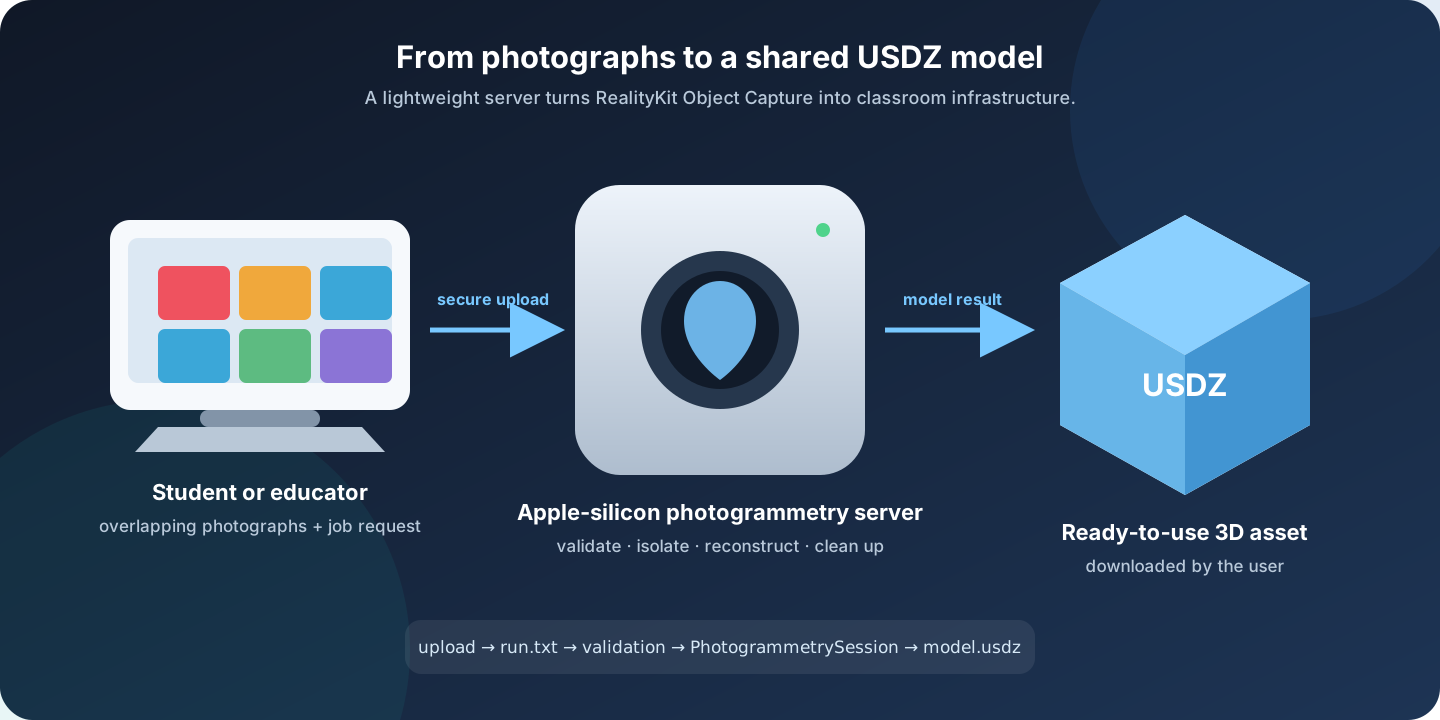
The project described here turns Apple’s RealityKit Object Capture into a shared service. Students photograph an object and upload the images. A dedicated Apple-silicon computer detects a job request, validates it, starts the reconstruction, and returns a USDZ model. Users benefit from the server without having to install or manage the photogrammetry pipeline themselves.
This system was designed and implemented by Alaric Hamacher for metaverse education at Kwangwoon University. It was published as Photogrammetry Server for Metaverse Education in the International Journal of Latest Engineering and Management Research (Hamacher 2023).
Read the complete published paper
TipWhat this project demonstrates
The server connects computer-vision software, Apple APIs, command-line tools, shell scripting, operating-system automation, user management, network transfer, file validation, and educational workflow design. The programming is valuable because it makes a difficult capability usable by other people.
Why build a photogrammetry server?
Photogrammetry software had already existed in several forms when the project was developed. VisualSFM could estimate cameras and point clouds; MeshLab could process and mesh 3D data; mobile applications could reconstruct an object locally or through commercial cloud services; and RealityKit offered a native Apple reconstruction framework.
For teaching, none of these options alone solved the complete access problem. The desired system needed to provide:
- simple access for students and educators;
- no additional software licence for each user;
- an operation that could be explained in a short classroom exercise;
- reproducible processing on known hardware;
- output as a ready-to-use 3D scene file;
- control and ownership of the uploaded photographs and generated model.
An entry-level Apple-silicon Mac mini was a practical processing node. RealityKit performed the computationally demanding reconstruction, while a small amount of custom code connected image upload, job execution, cleanup, and delivery.
The original 2023 system
Four cooperating layers
The prototype deliberately used familiar operating-system components. A dedicated user account provided remote access. A folder action monitored the upload directory. A small command-line program exposed Apple’s photogrammetry session. A shell script connected these pieces into an automatic job.
Remote access
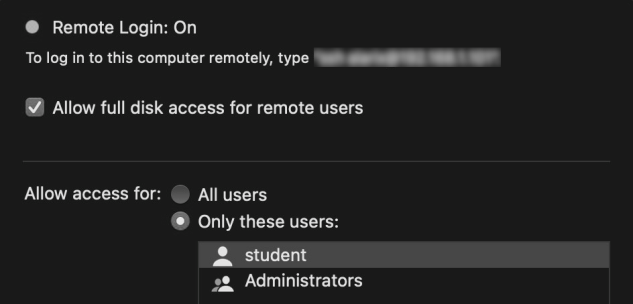
The paper’s prototype created a restricted user named student and enabled remote login for that account. Students could transfer the source photographs to the watched directory and later retrieve the completed model.
WarningHistorical implementation—not a current security prescription
The published system was a proof of concept for a controlled educational environment. A current deployment should use SFTP or another encrypted upload mechanism, avoid plain FTP, never grant unnecessary full-disk access, isolate each user’s files, restrict file types and sizes, and place the service behind appropriate authentication, logging, and network controls.
The run.txt job contract
Uploading photographs one by one causes a watched folder to change repeatedly. Starting the reconstruction after the first image would produce an incomplete job. The solution was a tiny but effective protocol: the server waits for a separate file named run.txt.
The marker tells the server that the image batch is complete. It also carries the information needed to name and identify the job. Only then does the folder action start processing.
20231234
museum_figure
In the published design, the two values identify the student or job and specify the desired model name. A production implementation should document one exact line order and validate both fields before constructing paths or commands.
The automation logic
Job lifecycle
flowchart TD
    A(["Upload folder changed"])
    B{"run.txt present?"}
    C["Wait for more files"]
    D["Read job ID and model name"]
    E{"Syntax and inputs valid?"}
    F["Create isolated job directory"]
    G["Move photographs into the job"]
    H["Run RealityKit photogrammetry"]
    I{"Model created?"}
    J["Publish USDZ result"]
    K["Record error and preserve diagnostics"]
    L["Clean temporary data"]

    A --> B
    B -- "no" --> C
    B -- "yes" --> D
    D --> E
    E -- "no" --> K
    E -- "yes" --> F
    F --> G --> H --> I
    I -- "yes" --> J --> L
    I -- "no" --> K

    classDef event fill:#eef5ff,stroke:#3178c6,color:#12233b,stroke-width:2px;
    classDef decision fill:#fff7e8,stroke:#d38b22,color:#3a2a10,stroke-width:2px;
    classDef action fill:#edf9f3,stroke:#25966d,color:#12372b,stroke-width:2px;
    classDef error fill:#fff0f0,stroke:#cb4141,color:#4a1717,stroke-width:2px;
    class A,C,J,L event;
    class B,E,I decision;
    class D,F,G,H action;
    class K error;
An annotated shell implementation
The following example expresses the core logic of the published script while making the file handling and validation easier to follow. It is illustrative, not a complete hardened service.
#!/bin/bash
set -euo pipefail

watch_dir="/Users/student/Pictures/watch"
run_file="$watch_dir/run.txt"
result_dir="$watch_dir/results"

# A folder change is not a job until the marker exists.
[[ -f "$run_file" ]] || exit 0

# Read the two-line job request.
student_id="$(sed -n '1p' "$run_file")"
model_name="$(sed -n '2p' "$run_file")"

# Accept only deliberately narrow identifiers and filenames.
[[ "$student_id" =~ ^[0-9]+$ ]] || exit 1
[[ "$model_name" =~ ^[A-Za-z0-9_-]+$ ]] || exit 1

job_dir="$watch_dir/job-${student_id}-${model_name}"
mkdir -p "$job_dir" "$result_dir"

# Remove the marker before moving files so the folder action cannot
# start the same request a second time.
rm -- "$run_file"
find "$watch_dir" -maxdepth 1 -type f \
  \( -iname '*.jpg' -o -iname '*.jpeg' -o -iname '*.heic' \) \
  -exec mv -- {} "$job_dir/" \;

# The compiled Apple sample exposes PhotogrammetrySession as a CLI.
/usr/local/bin/HelloPhotogrammetry \
  "$job_dir" \
  "$result_dir/${model_name}.usdz" \
  -d reduced

rm -rf -- "$job_dir"
The script demonstrates several important programming decisions:
- Explicit triggering: the existence of
run.txtdistinguishes a complete batch from an upload still in progress. - Input validation: identifiers are restricted before being used in paths.
- Job isolation: every reconstruction receives its own image directory.
- Loop prevention: the trigger is removed before processing begins.
- Deterministic output: the result has a predictable USDZ filename and location.
- Cleanup: source images can be removed after successful processing to free storage and reduce unnecessary retention.
NoteWhat the short script leaves out
A dependable multi-user service also needs locking, quotas, upload completion checks, MIME verification, timeouts, per-job logs, failure retention, free-space monitoring, notifications, and a policy for deleting both source and result files. rm -rf must never be used on a path that has not been constructed and validated safely.
RealityKit as the processing engine
The server used a small command-line program based on Apple’s Object Capture sample. The program creates a PhotogrammetrySession, receives the input image directory and output URL, selects a detail level, and monitors asynchronous progress until RealityKit finishes the model (Apple Developer, n.d.).
Conceptually, the server invokes:
HelloPhotogrammetry ./images ./results/object.usdz -d reducedThe reduced detail level was appropriate for an educational workflow where processing time, download size, and immediate usability mattered. Higher detail can be exposed as a validated job option when server capacity permits.
The resulting USDZ asset is ready for compatible spatial applications and can also enter Blender or another content-authoring workflow for inspection and refinement.
What students experience
The technical pipeline disappears behind a short sequence:
- photograph an object from many overlapping viewpoints;
- transfer the original photographs to the assigned upload folder;
- add the completed
run.txtrequest; - wait while the server reconstructs the model;
- retrieve the resulting USDZ file;
- place the asset into a spatial or metaverse project.
The educational benefit is not merely convenience. Centralizing reconstruction gives a class consistent hardware and settings, leaves more teaching time for capture quality and spatial storytelling, and lets students create assets from their own physical environment.
A stronger modern implementation
The published project intentionally demonstrated the smallest workable system. Its core idea remains useful, but the service boundary can now be made clearer:
| 2023 proof of concept | Recommended modern service |
|---|---|
| Remote-user upload folder | Authenticated HTTPS upload or restricted SFTP |
| Folder action | Persistent queue worker or launch daemon |
run.txt trigger |
Atomic job manifest with a generated job identifier |
| Shared result folder | Per-user result storage with expiry |
| Immediate cleanup | Configurable retention and failure quarantine |
| Minimal console output | Structured job logs, progress, and notifications |
| One quality choice in script | Validated presets with resource limits |
A small web interface could upload the images, display the queue, show processing progress, and return the model without exposing operating-system accounts. The original folder-action design remains valuable because it proves the complete automation path with very little infrastructure.
Published research
The peer-reviewed article documents the educational problem, comparison of available technologies, dedicated-server setup, user access, folder action, trigger file, shell code, classroom operation, and future improvements.
Download and cite Photogrammetry Server for Metaverse Education
Suggested reference:
Hamacher, A. (2023). “Photogrammetry Server for Metaverse Education.” International Journal of Latest Engineering and Management Research, 8(2), 82–87.
References
Apple Developer. n.d. “RealityKit Object Capture.” Accessed August 1, 2026. https://developer.apple.com/documentation/realitykit/realitykit-object-capture.
Hamacher, Alaric. 2023. “Photogrammetry Server for Metaverse Education.” International Journal of Latest Engineering and Management Research 8 (2): 82–87. http://www.ijlemr.com/papers/volume8-issue02/13-IJLEMR-77741.pdf.