Stereo Window
The stereo window is the apparent plane through which a viewer sees a stereoscopic scene. In a cinema it normally coincides with the physical screen; on a television it coincides with the display surface; and in a headset it may correspond to a virtual display plane defined by the presentation system.
Imagine that the display is not a flat picture but an opening in a wall. Some objects appear behind the opening, some touch its surface, and some seem to extend through it toward the audience. That imagined opening is the stereo window.
The stereo window is the depth plane where corresponding points in the left and right images have zero horizontal separation on the display.
The window as a depth reference
The stereo window divides the perceived scene into three regions:
| Position | Image relationship | What the viewer perceives |
|---|---|---|
| In front of the window | Negative parallax | The object appears to project toward the audience |
| On the window | Zero parallax | The object appears to sit on the display surface |
| Behind the window | Positive parallax | The object appears to recede behind the display |
These terms use the common digital-cinema convention. Some technical fields use different sign conventions, so it is always sensible to state what “positive” and “negative” mean in a particular document or application.
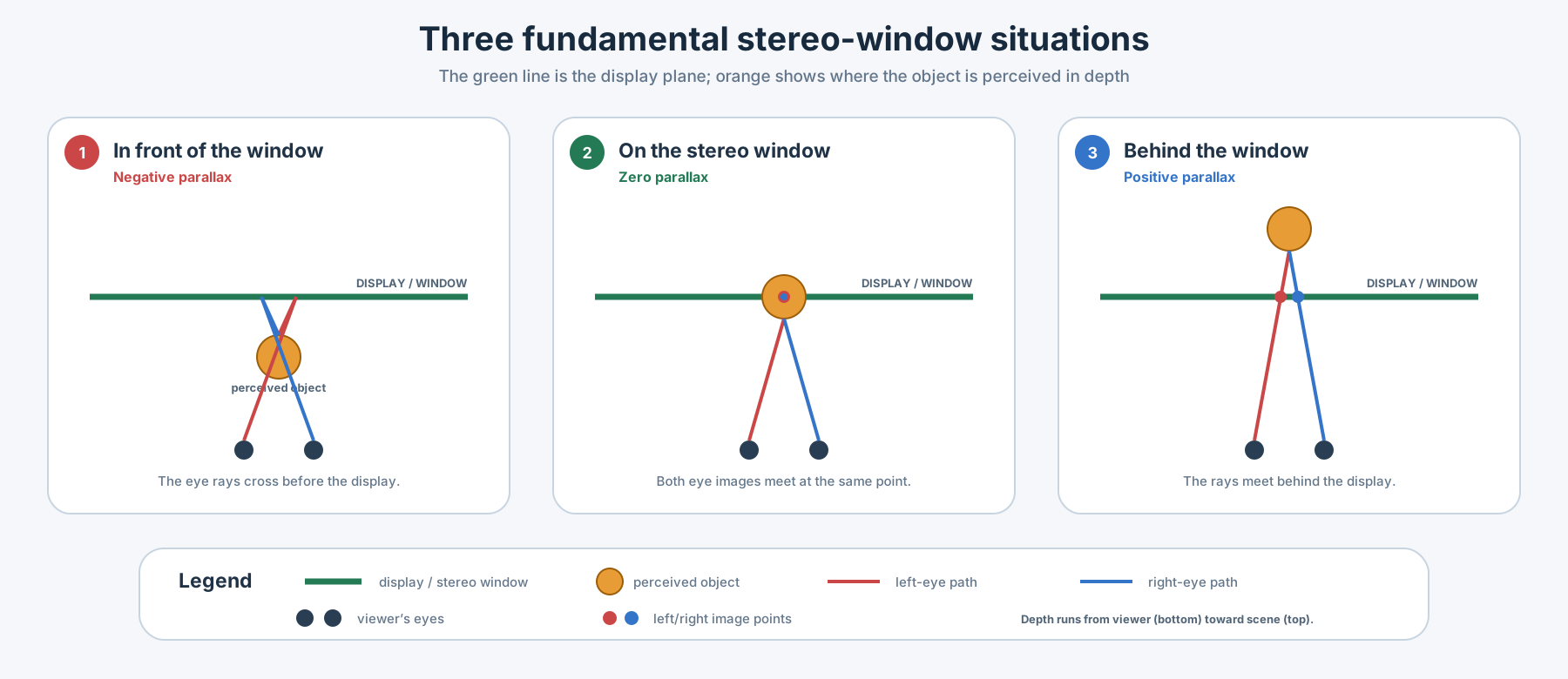
Zero parallax
Choose one visible point in the scene and compare its horizontal position in the left and right images.
If the point appears at the same screen position for both eyes, it has zero parallax. The viewer therefore perceives it on the stereo window. This is why the stereo window is also called the zero-parallax plane or screen plane.
Zero parallax does not mean that the scene has no depth. It simply identifies the reference plane from which depth is perceived in front or behind.
Negative parallax: in front of the window
With negative parallax, the left- and right-eye rays cross between the viewer and the display. The object therefore appears to float in front of the screen.
This can create a strong and exciting effect, but it consumes part of the viewer’s comfort budget. Large foreground parallax, fast motion, or an object very close to the viewer can make fusion difficult.
Positive parallax: behind the window
With positive parallax, the corresponding left- and right-eye points are separated so that the object appears behind the display.
Positive parallax is commonly used for backgrounds and distant scenery. However, the physical separation of corresponding points must be checked at the intended display size. If it becomes too large, the viewer’s eyes must diverge outward beyond parallel, effectively asking them to look “beyond infinity.”
A simple way to imagine it
Picture a person standing behind an open window and holding a flower through it:
- the room and the person’s body are behind the stereo window;
- a hand resting on the frame is on the stereo window;
- the flower extending toward you is in front of the stereo window.
The window itself does not move, but it provides the reference that makes all three depth positions understandable.
Placing an actor on the stereo window can make the image feel stable and comfortable. Placing an object slightly in front can emphasize it. Moving the whole scene too far forward or backward may waste depth range or create uncomfortable parallax.
Window violations
A window violation occurs when the depth information and the visible frame edge contradict each other.
For example, imagine a person who appears in front of the screen but is cut off by the left edge of the image. Stereoscopic depth says the person is closer than the window, while the frame edge says the window is physically in front and hiding part of the person. The brain receives two incompatible depth signals.
Window violations are especially noticeable when:
- an object with strong negative parallax touches the left or right edge;
- a foreground object enters or leaves the frame;
- subtitles or graphics are positioned at an incompatible depth;
- left and right crops do not match;
- stabilization or image alignment changes the edges independently.
Common solutions include reducing negative parallax, reframing the shot, cropping both eyes consistently, repositioning the stereo window, or using a floating window.
Floating windows
A floating window uses slightly different black masks or crops at the left and right edges of the two eye images. These masks change where the viewer perceives the side boundaries of the stereo window.
The technique can move a troublesome edge backward and hide a window violation without changing the depth of every object in the shot. Floating windows are widely useful, but they must be applied carefully: excessive or inconsistent masking can become visible and distract from the image.
How the stereo window is set
The window position is determined by the horizontal alignment of the left and right images.
In a common parallel-camera workflow:
- Both cameras record with parallel optical axes.
- The left and right images are geometrically aligned in post-production.
- One image is shifted horizontally relative to the other.
- The chosen corresponding point is brought to zero parallax.
- That point now appears on the stereo window.
- Foreground and background parallax are checked against the delivery format.
Toe-in camera convergence can also place a subject near the window during capture, but it introduces keystone differences and vertical disparity that usually require correction. For this reason, many professional workflows prefer parallel capture and controlled window placement in post-production.
Choosing a useful window position
There is no single correct position for every shot. A practical choice depends on:
- the nearest and farthest important objects;
- the amount of negative and positive parallax;
- screen size and viewing distance;
- whether the frame edges cut foreground objects;
- subject movement toward or away from the camera;
- shot transitions and continuity with adjacent shots;
- subtitles, captions, graphics, and other screen-plane elements;
- the intended audience, including children;
- cinema, television, headset, or other presentation geometry.
A comfortable window placement distributes the available depth around a clear reference plane. It supports the composition instead of drawing attention to the mechanics of stereoscopy.
The best window position cannot always be judged from one frame. Watch moving subjects, cuts, camera movement, subtitles, and objects crossing the frame edges. A window that works at the beginning of a shot may fail a few seconds later.
Relationship to stereobase
The stereobase controls how different the two camera viewpoints are. The stereo window controls where those differences are placed relative to the display surface.
They are related but not interchangeable:
- changing the stereobase changes the recorded depth scale and disparity;
- shifting the stereo window redistributes existing disparity between the foreground and background;
- moving the window cannot repair a stereobase that created an excessive total depth range.
This distinction is essential: stereobase shapes the depth; the stereo window positions that depth around the screen.